Power Up, Not Replace: Why Choosing an Aftermarket Battery is the Smart Choice for Your Device
In our fast-paced digital world, we’ve grown accustomed to a troubling cycle: a device’s battery life dwindles, and we feel pressured to buy the latest model. But what if the most economical, eco-friendly, and practical solution was already in your hands? Choose an aftermarket replacement battery for your OPPO Reno9 5G BLP973, giving it a new lease on life instead of consigning it to a drawer or landfill.
The High Cost of New: More Than Just Money
The most immediate benefit of a battery replacement is financial. A new flagship smartphone, laptop, or tablet can cost well over a thousand dollars. In contrast, a high-quality aftermarket battery for your OPPO Reno9 5G BLP973 typically costs a fraction of that.
But the cost isn't just monetary. Manufacturing a new device has a significant environmental footprint—from mining rare earth metals to the carbon emissions of global shipping and packaging. By opting to repair, you directly combat electronic waste (e-waste), which is one of the fastest-growing waste streams globally. Choosing a new battery for your OPPO Reno9 5G BLP973 is a powerful personal step toward sustainability.
Debunking the Myths: Quality and Performance
A common concern is that aftermarket parts are inferior. While it’s crucial to buy from reputable suppliers, many aftermarket batteries are manufactured to meet or even exceed original equipment specifications. In some cases, you can find
Performance anxiety is natural, but a quality replacement battery can restore your OPPO Reno9 5G BLP973 to its former glory. That means no more scrambling for chargers by midday, no unexpected shutdowns at critical moments, and regaining the full, mobile potential of your trusted gadget. It’s about restoring the freedom and reliability you expected when you first bought your OPPO Reno9 5G BLP973.
The Like-New Experience Without the Learning Curve.
Buying a new device means adapting to a new interface, transferring data, reconfiguring settings, and often buying new accessories. When you replace the battery in your current device, you retain the familiar ecosystem you’ve built. All your apps, preferences, and workflows remain intact. The muscle memory you’ve developed with your OPPO Reno9 5G BLP973 stays relevant, boosting your productivity from the moment you power it back up.
Conclusion: A Empowered Choice for Your Wallet and the World
Replacing the battery in your OPPO Reno9 5G BLP973 is an act of practical empowerment. It’s a declaration that you value your investment, reduce unnecessary waste, and refuse to be pushed into an endless upgrade cycle. The next time your OPPO Reno9 5G BLP973 struggles to hold a charge, remember: you don’t have to replace the whole system. You can simply revive its heart.
Give your trusted gadget the power boost it deserves. Explore aftermarket battery options today and rediscover the full, lasting potential of your OPPO Reno9 5G BLP973
Part Numbers
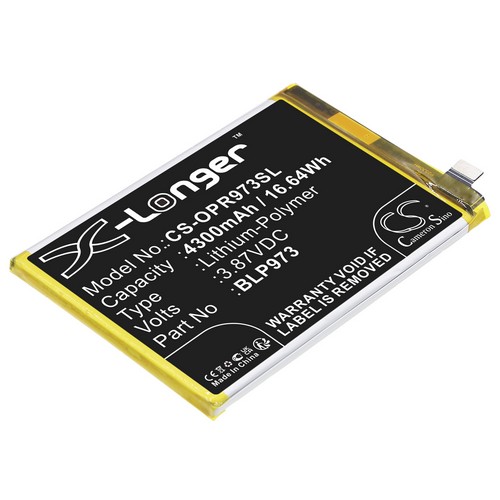
BLP973
Model Numbers
Reno9 5G
PHM110
Reno 9 Pro
PGX110
Technical Data
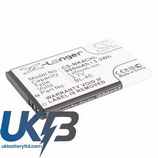
Capacity :4300mAh
Battery Type :Li-Polymer
Colour :Black
Voltage :3.87V
Watts :16.64Wh
In our fast-paced digital world, we’ve grown accustomed to a troubling cycle: a device’s battery life dwindles, and we feel pressured to buy the latest model. But what if the most economical, eco-friendly, and practical solution was already in your hands? Choose an aftermarket replacement battery for your OPPO Reno9 5G BLP973, giving it a new lease on life instead of consigning it to a drawer or landfill.
The High Cost of New: More Than Just Money
The most immediate benefit of a battery replacement is financial. A new flagship smartphone, laptop, or tablet can cost well over a thousand dollars. In contrast, a high-quality aftermarket battery for your OPPO Reno9 5G BLP973 typically costs a fraction of that.
But the cost isn't just monetary. Manufacturing a new device has a significant environmental footprint—from mining rare earth metals to the carbon emissions of global shipping and packaging. By opting to repair, you directly combat electronic waste (e-waste), which is one of the fastest-growing waste streams globally. Choosing a new battery for your OPPO Reno9 5G BLP973 is a powerful personal step toward sustainability.
Debunking the Myths: Quality and Performance
A common concern is that aftermarket parts are inferior. While it’s crucial to buy from reputable suppliers, many aftermarket batteries are manufactured to meet or even exceed original equipment specifications. In some cases, you can find
Performance anxiety is natural, but a quality replacement battery can restore your OPPO Reno9 5G BLP973 to its former glory. That means no more scrambling for chargers by midday, no unexpected shutdowns at critical moments, and regaining the full, mobile potential of your trusted gadget. It’s about restoring the freedom and reliability you expected when you first bought your OPPO Reno9 5G BLP973.
The Like-New Experience Without the Learning Curve.
Buying a new device means adapting to a new interface, transferring data, reconfiguring settings, and often buying new accessories. When you replace the battery in your current device, you retain the familiar ecosystem you’ve built. All your apps, preferences, and workflows remain intact. The muscle memory you’ve developed with your OPPO Reno9 5G BLP973 stays relevant, boosting your productivity from the moment you power it back up.
Conclusion: A Empowered Choice for Your Wallet and the World
Replacing the battery in your OPPO Reno9 5G BLP973 is an act of practical empowerment. It’s a declaration that you value your investment, reduce unnecessary waste, and refuse to be pushed into an endless upgrade cycle. The next time your OPPO Reno9 5G BLP973 struggles to hold a charge, remember: you don’t have to replace the whole system. You can simply revive its heart.
Give your trusted gadget the power boost it deserves. Explore aftermarket battery options today and rediscover the full, lasting potential of your OPPO Reno9 5G BLP973
Part Numbers
BLP973
Model Numbers
Reno9 5G
PHM110
Reno 9 Pro
PGX110
Technical Data
Capacity :4300mAh
Battery Type :Li-Polymer
Colour :Black
Voltage :3.87V
Watts :16.64Wh